09 May, 2011

Install tweetdeck in Ubuntu 11.04

TweetDeck is an adobe air application that helps us to perform all the online social networking activities using a single platform. It comes as a personal real time browser for connecting you with your contacts across Twitter, Facebook, MySpace, LinkedIn, Foursquare, Google Buzz and more... 


Installation

We need to install Adobe air installer prior to the installation of the tweetdeck. This is because the tweetdeck is built on adobe air framework. You can download the latest version of the adobe air installer linked here. Select .deb from the dropdown list asking for the version to download. 


Double click on the downloaded file (.deb) to install it using the Ubuntu Software center. 

Ignore the bad quality package error if it is shown by the package manager and continue installation...
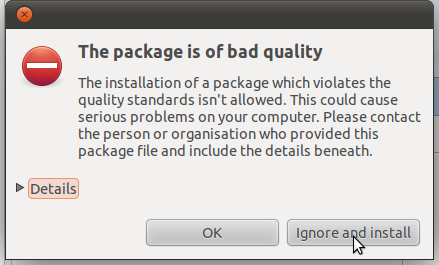
You can access the Adobe air  installer later from Applications >> accessories for installing other applications based on air framework. 


Now download the tweetdeck.air file from this link. To install it first take the adobe air installer and browse for the tweetdeck.air file.


Then the tweetdeck installer will pop up and begin as shown in the following figures..


Thats all the information needed for installing tweetdeck in ubuntu 11.04. Tweetdeck will ask for authorizing your facebook, twitter etc... accounts in the first login itself... From my point of view tweetdeck is powerful and eyecandy since it provides better interface than any other desktop social networking applications does and it also integrates many social networking communities within a single interface. Lot of customizations are also possible...


Read rest of entry

18 April, 2011

Social networking on mobile phone without internet connection

Hai friends, in this post we will discuss two ways for accessing the most common social networking websites anywhere within india through mobile phones without an internet connection. Usually these applications updates your status or brings your recent wall posts on social networking websites by sending and receiving Short Messaging Service (SMS dude !!!). These applications discussed below offers access to twitter, facebook, google mobile services etc...


smstweet   ::  for tweeting on the go via sms

shorthand browser  ::  its a j2me application that can run on your phones that support java  


# smstweet 

Smstweet is a web based application for posting twitter feeds only. You have to register your mobile phone number with the website. After successful registration it will connect your twitter account with the smstweet server. That's you need to do on the website. You can start posting your tweets and mentions by sending the message as formatted below to the number : 
09243000111 (Bangalore)

TWT <space > content of the tweet


# shorthand browser

Shorthand browser is an all-in-one mobile application  for accessing many social networking sites and it  is described as  "the internet on your  phone without a data plan".  Shorthand’s apps use SMS text-messages to send and receive information but look so good you’ll think they use data (they don’t!). “SMS Apps” for all your favorite web sites are bundled within one super simple mobile application, Shorthand. Using shorthand you can access the following websites. 

Orkut
Facebook
Google - maps, cricket, horoscope, news ...
Twitter
Wikipedia
Naukri
• SMS GupShup
• And more!
 
You can download the shorthand browser from the following links 


That's all about the social networking mechanism that does not requires a data plan on your mobile phone...
Read rest of entry

26 September, 2010

Orkut affected by Bom Sabado: next threat to social networkng

After the problems that hit the twitter last week, google's social networking website Orkut being hit hard by the “Bom Sabado” javascript worm, which infected users with scraps containing “Bom Sabado”. The word "Bom Sabado" means "Good Saturday" in Portuguese, which is also the official language of Brazil, one of the last remaining Orkut bastions in the world. The worm seems to be posting scraps with the text "Bom Sabado" and also adding affected users to new Orkut groups which is having explicit contents. Such XSS attacks have targeted Orkut in the past too. Please urgently perform the following steps to avoid the spread of bom sabado and to avoid becoming the victim of it. Its more than a day the virus attack being happened and the problem is not fixed within this time...

    1. DO NOT visit any profile on Orkut till this script is blocked. Better to avoid using orkut till the google fix the problem

    2. Clear your browser cookies and cache right away and change your password

    3. Use the Google Acconts link here to change the password 

    4. Avoid replying to the Bom Sabado scraps...


Read rest of entry

03 June, 2010

How to add Twitter and Facebook gadgets to gmail inbox


This is simple technic lets you to add both the facebook and twitter gadget to the left side of your gmail inbox. You can see the tweets, direct messages and perform all the twitter activities from within your gmail account. The case is same for the facebook also...


Follow the steps to setup this feature in your gmail inbox.

1. Login  to your gmail account and take the google labs from the more --> even more button.


2. You will be redirected back to your inbox, with settings tab opened. Enable the Add any gadget by URL option and save the changes.


3. Then click on the Gadgets tab and add the URL of the twitter and facebook gadgets by copying the following lines onto the text box given there


4. Thats all for now.  You can write your tweets in the widget box in the left side and see everything in twitter by clicking on the expand button


Read rest of entry
 

Terminal Diary | techblog Copyright © 2009 Gadget Blog is Designed by jintu jacob Powered by Blogger